Introduction
I have always enjoyed simulation games – specifically for sports. Going back to the Sega Genesis, PS1, PS2, and more – if you were to set up 2 teams against one another and hit “Go” no two games were going to be exactly the same.
That type of weighted randomness has been fascinating and it is what makes sports so exciting to watch. Any team could beat any team if the circumstances are right.
Creating a sports simulation became one of my personal projects each time I learn a new engine or a new language. Shortly after I’d learn how to write “Hello World”, I would learn how to print a random number, then I would print out 2 numbers, then I would highlight whichever of the 2 numbers were highest – boom, that is a sports simulation.
During work or any long period of stationary time, I enjoyed having a baseball simulation going on in the background produced by my brother. Every new season had a randomly generated lineup and it would collect stats – https://carson.cknoble.com/projects/baseball/ – I really enjoyed it and wanted to make something similar that I could have in the background and let games play out with no human interaction.
Around this time, Harry Potter Quidditch Champion was being released. Being a large Harry Potter fan, I thought this was a good excuse to try my hand at it.
Production Process
Objective 1: Figure out how to program a game of Quidditch
Quidditch is a fictional game with fictional rules.
In short – if you take the soccer ball sized ball and throw it through an opposing hoop, you get 10 points. If you capture the Golden Snitch, the game ends and the team gets 150 points.
The snitch is a unique design challenge that I needed to work around. There is no time limit in Quidditch. The game does not end until the snitch is captured.
Objective 2: Program in the logic of a single game
Teams – I needed 2 teams with 7 players on each team – 3 Chasers, 2 Beaters, 1 Keeper, and 1 Seeker. Each position on each team had stats based around their position – speed, blocking, grabbing, shooting, etc. These ‘teams’ became the programming backbone of the different game modes
Seekers – With the Snitch being the most important element – I made that element first. This is a 2d game, but for the Snitch, I created a game object that would randomly move in a 3d space.
After a certain period of time, I would turn the 2 Seekers “on” and have them randomly move in a 3d space until they “saw” the Snitch (they got within their ‘sight’ range), then they would start to follow the Snitch. If they got within a certain range (their ‘grab’ distance), they would make an attempt to catch the Snitch. There would be attempts (essentially a coin flip), as to if they would catch it or not. If they caught it – their team would get 150 points and the game would end.
Chasers / Keepers – Chasers are in charge of transporting the Quaffle up and down the pitch. Since this is a 2d game, I kept a “Pitch Location” variable. If the Chaser has the Quaffle, they would move up or down the pitch at their “Speed”, then if they were within range of the end of the pitch, they would use their “Shoot” skill to randomly choose between one of the 3 hoops to throw the Quaffle. The Keeper (goalie) would then make a check against the Chaser’s shooting ability to see if they block the shot. If they do block it, it was a turnover to the other team. If they did not block it, it was 10 points to the shooting team followed by a turnover. Chasers are also able to “tackle” the Chaser with the Quaffle. If they do, there is a turnover.
Beaters – The objective of the Beaters is to stop the other team from doing things. They have a set chance to find a “Bludger”(a large iron ball) and hurl it at a position on the opposing team. There is a check if the position can “dodge” the incoming bludger. If they don’t, they are ‘hit’ and the hit position becomes inactive for a period of time. If a Chaser is hit with the Quaffle, they drop the Quaffle. If a Keeper is hit, any shot on goal would be allowed in. If the Seeker is hit, they cannot pursue the Snitch. If a Beater is hit, they cannot send off a Bludger.
Objective 3: Create 2 teams to go against each other and a Stats page
Once the logic of each position was done, then we could face each team off in a 1 on 1 format with the entire game reloading after the game was done. This was the core loop of the game. Hit “Go” -> watch them play -> reload it when the game was done. Fully sustainable with no player impact.
I also created a Match Stats page that featured how long the game was, and the different stats from different positions (like a Box Score)
From there – I could create different teams and slot them into Home and Away. I created the 4 Hogwarts Houses that the player could choose from. When that 1 versus 1 mechanic was completed with the 4 Hogwarts houses, I considered the project done!
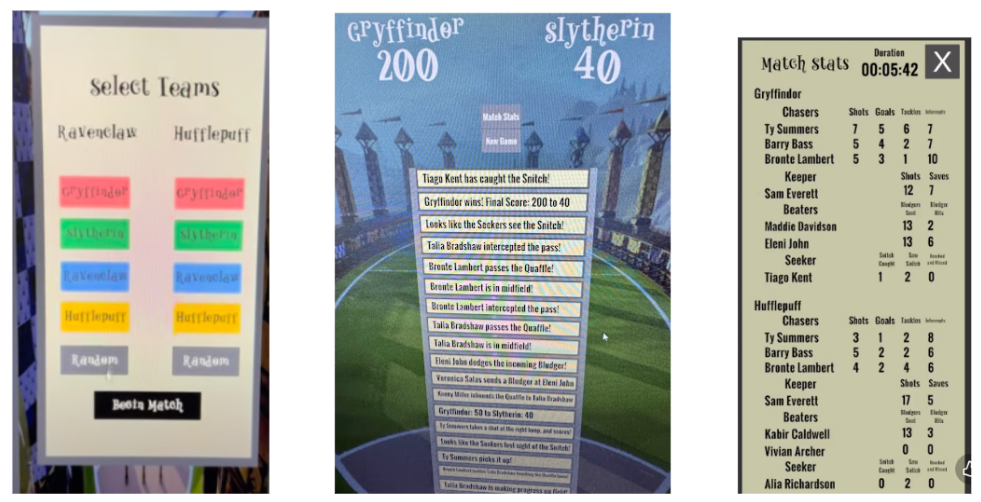
I posted a build walking through the logic and shared it to friends.
After sharing it, a designer friend – Adrian Rosario – reached out saying he wanted to take a shot at the design work of the game. I gave him access to the project and within days, he made it look 100x better. Not wanting to let his efforts go to waste, I started working on a version 2.0.
Version 2.0
I added several teams for Hogwarts, the British Isles, and the World Cup – each with a different level of strength and a different team focus (for example: France was good at passing, but bad at shooting)
This also saw the introduction of the Momentum graph allowing the user to see the score flow throughout the game
Version 2.1 and Version 2.2
A couple of weeks after 2.0, I went back in, working with Adrian and created a Season mode – allowing a series of games to be played back to back where the user could see how certain teams would do over a long period of time (2.1 saw the Hogwarts Season, 2.2 saw British Isles and World Cup).
We also worked on an overhaul of the Exhibition menu (mimicking sports games).
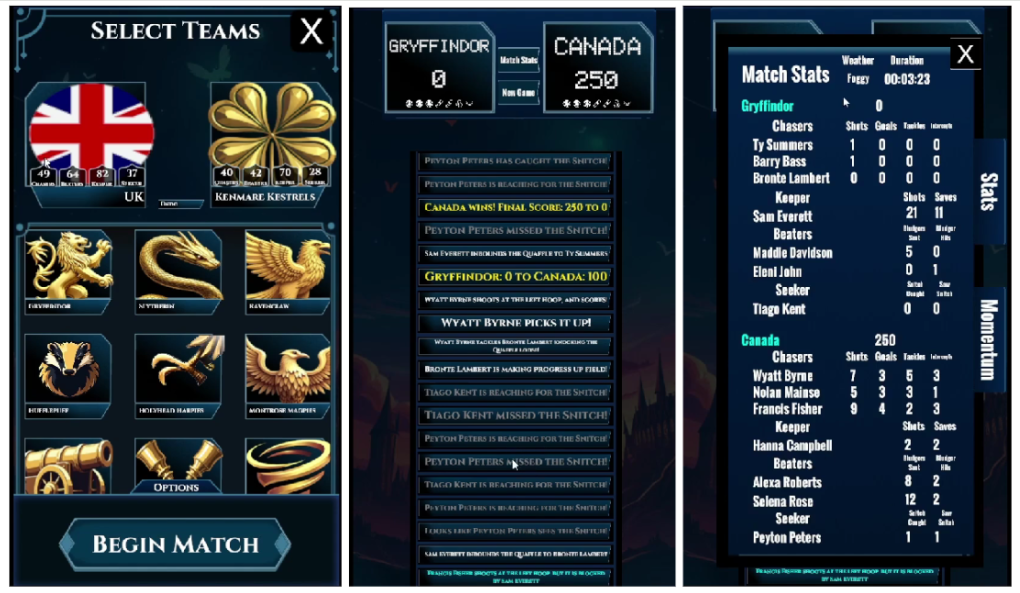
In this process, I saw that Adrian had called it “Quidditch Manager” on the title screen instead of “Quidditch Simulator”. A normal person would go “‘hey, could you change the name to be ‘Simulator’?”
Nope, I thought “how hard could it be to add a Management function to this?”
Fun fact: “how hard could it be” is always answered by “much harder than you think”
Version 3.0
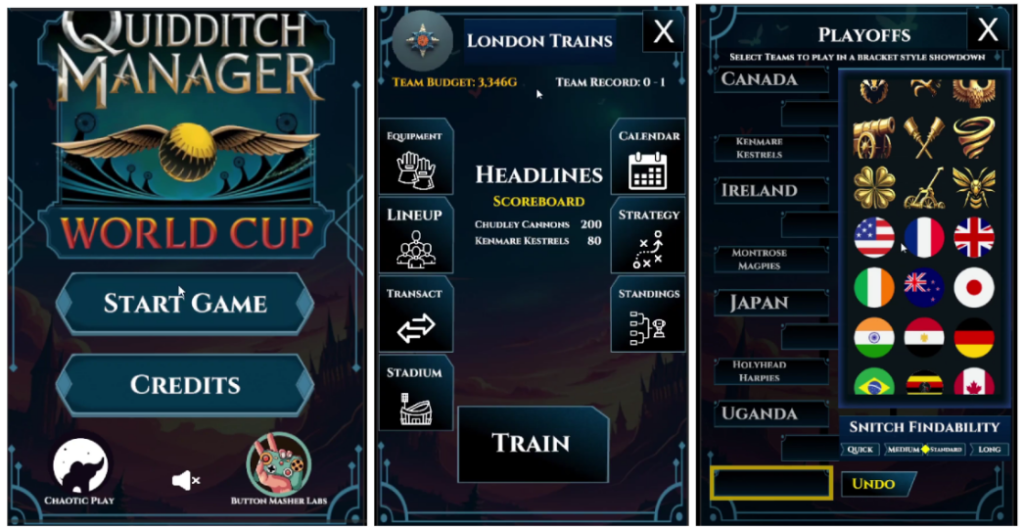
To make the ‘Management’ mode, I borrowed ideas from other simulation games like Idle Baseball Tycoon, Backyard Baseball, and MLB the Show. Where the player could:
- Choose their team name, location, and lineup (staying within a budget)
- Buy equipment to give to their players
- Buy stadium upgrades to increase their revenue per game
- Had a set schedule so you knew who you would be playing when
- Team strategy options
- The ability to trade players
- Standings to see how you were doing against other people in the league
- Team training – on any off-day, you would have to balance your player’s energy and what you wanted them to work on so they could improve their skills – but you don’t want them to work too hard and be tired for game day or they would play worse.
- Playing the games! – this was the standard game flow, but every player on your team would get experience based on what they did in the game which would lead them to be better players.
This version also saw the introduction of:
- Playoff mode – you choose 8 teams in a bracket style format to choose a winner
- Stadiums were created and assigned to every existing team. Each stadium also included a set chance for weather. If the team was playing in their correct home stadium, they would get a small buff. If the team was playing in more advantageous weather, they’d also get a small buff (Example: Team Egypt did was will in hot weather, but worse in Snow)
- Quality of life
- Game acceleration – you could choose to watch at .5x up to 5x the speed
- Auto next game – if you are doing a Season mode, you could turn this on and it flows from one game to the next so you don’t have to baby sit it after each game
And with that! The game was *officially* done! We had a management mode, 3 different simulation modes including – Exhibition, Season (with 3 different seasons), and a Playoff mode. Much larger than the original vision of the project.
Challenges
What started as a humble project turned into a scheduling juggernaut around other projects
Training: Working with a designer on this game caused some branch hiccups, I could’ve spent more time training him to ensure he knew what he was doing since it was his first time using the engine. I originally chalked it up to ‘that is the learning curve of the engine’, but I could’ve set him up better which would’ve prevented some hiccups later in development.
Tech Debt. The core piece of the game is making sure the snitch is caught. The game doesn’t end until that is caught. I had to be suuuuuper careful to touch anything around that code. When I initially built it, I built most of the Seeker logic through the Chasers code (which made sense at the time) and I never untangled it – so that was messy to work through.
Trying to learn from that, I did future proof other elements of the game, branching off logic of how the players, teams, and how matches are played helped the management and playoff system come together better than anticipated
Tech Debt: this was supposed to be a small project so all of the initial code was living in the Game Manager…which was also the Main Camera. I never untangled all that logic so the Main Camera’s single script was unnecessarily massive.
Tech Debt: I had assigned public individual text variables that I needed to manually attach or change. This was a lot of unnecessary work that I eventually remedied when working on the Management mode by using more organized prefabs and children, but I didn’t go back and fix the original manual labor.
Management: I had a pretty clear idea how to approach this, but the tech details kept causing issues – saving/loading, player experience, scheduling, AI schedules – individually those pieces are fine, but smooshing them all together caused quite a few bugs.
One example: Scheduling. Each month had 28 days. The player could see every game that they needed to play in the season. Then the other 9 teams also had a schedule to maintain. At the end of the season, everyone needed to play the same number of games.
At the end of the month, the visual calendar was falling out of sync with the player’s calendar, which was falling out of sync with the AI calendar due to the math of which day the calendar needed to roll to a new month which led to some teams playing 5 or 6 more games per season than they should’ve. It was 3 different schedules around the same date tracking system that got messy. Then once you mix in saving and loading wrong numbers, it was a great place for bugs to flourish.
What went right
- Cheats!!! – this was a life saver. Creating a “Cheats” button and a large word of “CHEATS” at the bottom of the screen allowed me to hide timers and key presses to simulate days, weeks, seasons, jump to the end of a game, increase money, and others. Then, when you were done, you can turn them all off by turning off the checkbox in the Game Manager
- The Variety of Game Modes: Based on the existing logic, I was able to throw together a ‘Playoff’ mode in about 4 hours. The Season modes are all the same logic (except playoffs) with different season lengths and teams, that was easy to scale. Management was entirely new – but I saved that for last since it could borrow from a lot of existing systems.
- Working with Adrian. He is such a good designer. After he did the initial round of implementation, he left behind so many goodies that I could put in the rest of the game for a cohesive theme.
- Organization: by keeping the different game modes pretty well compartmentalized under parent objects, I was able to keep the code and game objects clean while borrowing logic from other locations in the game.
- I enjoyed it. I really enjoyed working on it. I enjoyed the challenges. I enjoy having it up in the background at work wondering who is going to win which tournament and creating the artificial drama that simulations provide.
Lessons Learned
- Cheats – I cannot understate how important cheats are when testing. If you are testing playoffs and you have to do an 84 game season where each game could take between 1-45 minutes, but you can hit a button and simulate all those games and just jump to the playoffs? Life saver. The more cheats, the better. And tying them all to one location that you can turn on and off with a button click? That was very helpful.
- Management – woooooow, this was a beast with a lot of parts that linked to each other. But learning how the simulation system worked, how to create a schedule, how to do player experience, how to do revenue and tying it back into the management economy without blowing it apart was a challenge, but one I very much enjoyed and want to do again in a future project.
- Saving / Loading – this is still a beast, but keeping all the saving and loading logic in one script that the different scripts would reference helped with tidiness.
- Scaling – if you plan on scaling it, don’t have all of your systems intertwined into one script – or – if you do – make sure you allocate time to splice everything out
This was a super fun project, I am so glad I was able to do it and grow alongside it to the point that it is today. Thanks again Adrian! This would not be anywhere close to looking this good without you.
Summary
- Studios: Chaotic Play and Button Masher Labs
- Title: Quidditch Manager
- Staff: 2
- Budget: $0
- Total Play Time: 4 hours (for Season Mode), 4 hours for Management mode
- Development Time: off and on for 1 year 4 months
- Release Date:
- 1.0 – October 2, 2024
- 2.0 – October 20, 2024
- 2.1 – October 23, 2024
- 2.2 – December 4, 2024
- 3.0 – November 26, 2025
- 3.1 – January 4, 2026
- Platforms: Itch.io
- Software Used: Unity, various AI
- DevLogs: https://www.youtube.com/playlist?list=PLUGaCRKIP_nbNtUoKAc_slnLNVffxFjhd
- Game Link: https://chaoticplay.itch.io/quidditch-manager